


















Table of Contents
- • Mailbird Review Summary
- • About Mailbird
- • Other opinions about Mailbird
- • Mailbird Desktop Email Client Overview
- • Mailbird Review
- • Mailbird Desktop Email Review
- • Mailbird Pros & Cons
- • Mailbird vs Outlook
- • Mailbird Usage & Features
- • Mailbird Return Policy
- • Mailbird Delivery and Access
- • Mailbird Warranty
- • Contact Mailbird Support
- • Where to buy Mailbird?
- • Conclusion of Mailbird reviews & ratings
Mailbird Review Summary
Mailbird is a desktop email client for Windows and Mac designed to streamline email management through a unified inbox and app integrations. It often serves users seeking an integrated solution among competing email clients. Overall, it offers generally smooth performance with productivity features but may have some limitations such as lack of mobile apps and subscription model concerns.
Highlights
- Suited for desktop users needing integrated email management
- Supports major email providers with cross-platform Windows and Mac clients
- Modern interface and app integrations balanced by no mobile app and licensing trade-offs
- Score: 7.8/10 reflecting usability and functional gaps
Within the desktop email client category, Mailbird provides an alternative to established options like Outlook and Thunderbird. Alternatives exist depending on user priorities for mobile support or licensing preferences. For detailed considerations, see the Mailbird review.
About Mailbird
Managing multiple email accounts on different platforms can disrupt workflow and reduce productivity. Users often face clunky interfaces and slow performance when switching between several email apps. These challenges create frustration and inefficiency in daily communications.
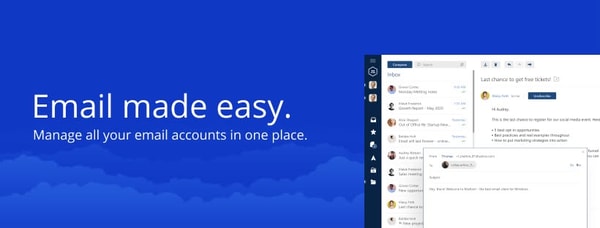
Mailbird is a desktop email client designed for Windows and Mac that centralizes multiple accounts into a unified inbox. It integrates with over 30 productivity apps to simplify email management. Positioned as a mid-range solution, it offers a modern alternative to traditional clients like Outlook and Thunderbird.
Mailbird serves over 4.4 million users globally and has earned industry recognition with awards such as Best Email Client 2024 and Highest User Adoption 2025. The software supports major providers including Gmail, Outlook, Yahoo, and Exchange, enhancing its credibility and broad appeal.
This client suits individuals and teams seeking streamlined desktop email management with productivity tools. However, it currently lacks a dedicated mobile app and uses a subscription model, which may not fit all users’ preferences. For detailed insights, see the Mailbird review.
Mailbird Desktop Email Client Overview
Mailbird is a desktop email client application available for Windows and Mac operating systems that consolidates multiple email accounts within a single unified inbox. It supports major providers such as Gmail, Outlook, Yahoo, and iCloud, aiming to streamline email management through integration with over 30 productivity applications. The software operates under a SaaS model offering both free and premium licensing options.
Mailbird’s operational model centers on developing cross-platform desktop applications to deliver enhanced email productivity, supporting millions of users globally. Its features include AI-powered email composition, built-in email tracking, and customizable workspaces that improve workflow efficiency. The product is distributed primarily through direct online sales on its official website, providing immediate digital download and license activation.
As highlighted in this Mailbird Review, the client is positioned in the mid-range market segment with a focus on usability and integration. Although it lacks dedicated mobile applications and has licensing changes from lifetime to subscription models, the software continues to support extensive email protocols and productivity tools. Its development emphasizes simplicity and modern design to accommodate individual users and business teams alike.
Mailbird Review
Mailbird is a software brand focused on delivering an integrated desktop email client for Windows and Mac users. It aims to simplify email management through a unified inbox that supports multiple accounts. The brand emphasizes productivity by incorporating various app integrations and AI-enhanced features.
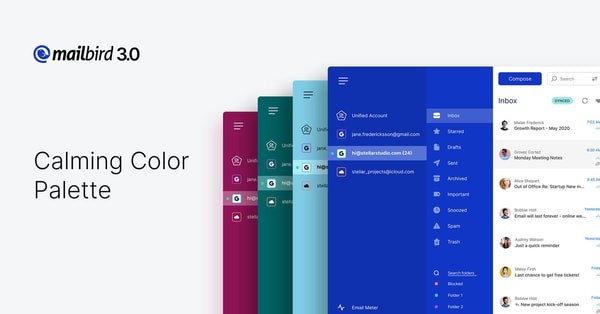
Mailbird offers a desktop email client that consolidates accounts from major providers like Gmail, Outlook, and Yahoo. It provides built-in email tracking, AI-powered drafting, and supports integrations with over 30 productivity applications. Positioned as a user-friendly alternative to traditional email clients, it caters to individual users and teams seeking streamlined communication tools.
Mailbird Highlights- Unified inbox for multiple accounts
- Integration with 30+ productivity apps
- AI-powered email composition
- Cross-platform license for Windows and Mac
- Support responsiveness appreciated
Mailbird Desktop Email Review
Mailbird is a desktop email client designed for individuals and teams to efficiently manage multiple email accounts. It supports major providers including Gmail, Outlook, Yahoo, iCloud, Exchange, and IMAP/SMTP accounts.
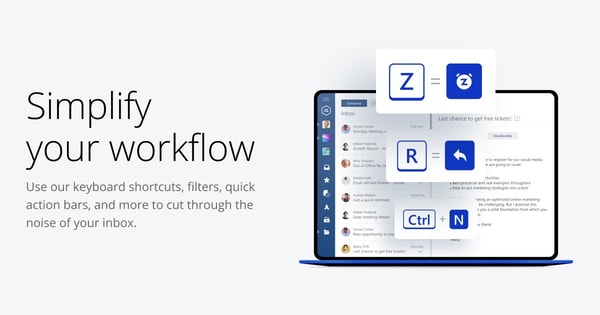
The client is available for both Windows and Mac with a cross-platform license, offering free and premium plans. Pricing options include subscription and lifetime payment models, with details available on the official website.
Mailbird features a modern, streamlined interface with app integrations and AI tools aimed at improving email management. Positioned as a mid-range client, it focuses on providing a simplified user experience compared to traditional email clients.
Check Price • getmailbird.com
Mailbird Pros & Cons
Mailbird offers a user-friendly desktop email client with a unified inbox that consolidates multiple accounts and integrates with over 30 productivity apps. Its support for both Windows and Mac through a cross-platform license, combined with AI-powered email drafting and built-in tracking, enhances email management for users seeking streamlined workflows. The interface is modern and clean, contributing to usability recognized by multiple industry awards.
Despite its strengths, Mailbird lacks a dedicated mobile app, which limits access for users needing email on the go. The Mac version does not support POP3 accounts, and some users have reported occasional bugs and performance issues. Additionally, the shift from lifetime licensing to a subscription model has raised concerns among some users who preferred the previous payment approach.
- • Unified inbox consolidates multiple accounts
- • Integration with 30+ productivity apps
- • AI-powered email drafting
- • Built-in email tracking tools
- • Cross-platform license for Windows and Mac
- • Modern, clean user interface
- • Industry award recognition
- • Responsive customer support
- • No dedicated mobile app
- • Subscription model replaced lifetime updates
- • POP3 support not available on Mac
- • Reported bugs and performance issues
Mailbird vs Outlook
Mailbird offers a modern, simplified user interface with strong focus on ease of use, unified inbox, and extensive productivity app integrations. Outlook provides a traditional, feature-rich client designed primarily for enterprise use with advanced corporate functionalities and wide adoption in business environments.
Both support multiple email accounts, email tracking, and calendar/contact integration, but Mailbird emphasizes user customization and productivity ecosystems, whereas Outlook prioritizes enterprise-grade features and integration with Microsoft services. This makes Mailbird a compelling choice for users seeking a streamlined email client and Outlook better suited for corporate and complex organizational needs.

- Modern, simplified UI
- Unified inbox
- App integrations
- Cross-platform license for Windows and Mac
- Focus on user customization

- Traditional enterprise features
- Unified inbox and contacts
- Calendar and email tracking integration
- Widely used in corporate environments
- Less focused on customization
Mailbird Usage & Features
Mailbird is a desktop email client that consolidates multiple email accounts into a unified inbox, supporting providers such as Gmail, Outlook, Yahoo, iCloud, Exchange, and any IMAP/SMTP accounts. The application is designed to enhance productivity through features like AI-powered email composition and built-in email tracking. It integrates with over 30 productivity apps including Google Calendar, Slack, and Dropbox for seamless workflow management.
Key features include a unified inbox for managing emails efficiently, a customizable workspace with themes, and a cross-platform license valid for both Windows and Mac. Users can also unsubscribe from emails and block unwanted senders to maintain an organized inbox. These features help users reduce app switching and streamline their email management for improved focus and efficiency.
Mailbird Return Policy
Mailbird offers a 14-day money-back guarantee period during which customers can request a refund if they are not satisfied with the product. No restocking fees or return charges are mentioned in the policy. Refund eligibility requires that the request be made within 14 days of the purchase date.
There are no specified exclusions to the refund policy, though deactivating the lifetime updates add-on will exclude the customer from receiving future feature updates. This policy ensures that customers have a clear timeframe for returns while understanding the implications of add-on services. Overall, the return process is straightforward with no additional fees stated.
Mailbird Delivery and Access
The software is available for digital download worldwide through the official website, with no physical products involved.
Customers receive immediate access to download the software upon purchase via a direct download link. There is no physical shipping or tracking since delivery is fully digital and instant.
Mailbird Warranty
Mailbird offers an optional lifetime updates add-on that provides ongoing features and major updates. Without this add-on, users receive only security and bug fixes. Discontinuing lifetime updates means no access to new features.
Standard software support and upgrade policies apply through official channels. Warranty details beyond this information are not explicitly specified. Users should refer to official sources for any additional terms.
Contact Mailbird Support
You can reach Mailbird support through several channels managed by the Customer Happiness Team. These options provide direct assistance for any questions or issues.
Please contact support whenever you need assistance or have inquiries. The team is available to help via email, phone, or the online contact form for timely support.
Where to buy Mailbird?
Mailbird is officially available for purchase exclusively through its website, where users can access a secure account system and reliable customer support along with transparent pricing and refund policies. Buying via getmailbird.com ensures direct access to the product and updates, while third-party marketplaces may offer different experiences in terms of reliability and support. Users should note that purchasing outside the official channel might involve variations in licensing terms or service quality, but the official platform remains the central source for clarity and control over the purchase process.
Conclusion of Mailbird reviews & ratings
Mailbird occupies an important space in the desktop email client category, offering a streamlined experience that supports multiple accounts with a unified inbox and extensive app integrations. Its focus on productivity and ease of use makes the offerings at getmailbird.com relevant for users seeking modern alternatives. The software’s cross-platform availability and AI-powered features further strengthen its position without overcomplicating the interface.
Exploring Mailbird can provide insight into how email management can be simplified while integrating with various productivity tools. Readers interested in a balanced view can revisit this Mailbird review to weigh its advantages and limitations thoughtfully over time. This perspective supports informed decisions based on practical use and preferences.
Editorial notes reflect aggregated buyer feedback and our independent editorial review of publicly available information. They are for informational purposes only and do not constitute endorsements. Purchases are made at your own discretion, and we are not responsible for transactions or outcomes related to this store. Experiences may vary. This content is assisted by AI and reviewed by our editorial team. While we strive for accuracy, AI-supported information may not always be 100% precise, so please verify any critical details.

